herefree 发布的文章

IELTS Exercise Schedule — What to Actually Do Each Day

Companion to 05-study-plan.md (the strategy). This file is the concrete exercises: exact materials, exact quantities, exact drills, day by day.
Your two rules baked in: (1) No Writing before August 15 — until then it's Listening + Reading only. (2) Because writing is dropped, L+R volume is pushed up to ~3 full tests/week.

0. "Is 2 tests a week enough?" — the honest answer

  • For skill-building, depth of review converts a test into score, not the raw count. One test fully reviewed beats three rushed.
  • BUT since you're doing no writing until Aug 15, that time is free — so yes, do more: aim for ~3 full tests/week of Listening + Reading (≈ one Cambridge book every ~1.5 weeks).
  • Non-negotiable rule: every test still gets its full review half. A test you don't review is mostly wasted, no matter how many you pile up.

1. Materials to get

Core (do almost everything from these):

  • Cambridge IELTS 12–19 (12, 13, 14, 15, 16, 17, 18, 19) — official past papers. Each book = 4 full tests. 32 tests total — plenty for the whole plan plus re-dos.
  • Each comes with audio + answer keys + transcripts (essential for review).
Use them in order, oldest first. Drill with the older books (12–16) during the Listening + Reading phase, and reserve the newest (17–19) for the final full mocks — recent papers best reflect the current exam, so you want them when simulating the real thing.

Free supplements: BBC 6 Minute English, TED, podcasts (extensive listening) · band-8/9 writing models (for the writing phase) · your booked classes/teachers (speaking).

One notebook or note app for your 3 lists: paraphrase list · error log (writing phase) · vocabulary list.

2. The drills (your exercise "recipes")

🎧 LSP — Listening Section Practice (~25 min)

  1. One Cambridge listening section (≈10 Q). 30 sec preview: underline keywords, mark anchors vs. meaning-words, predict each answer type.
  2. Play once, answer in real time.
  3. Check.
  4. Review (~12 min): find every answer in the transcript; for each wrong one ask why; add paraphrase pairs to your list.

🎧 JZ — 精听 / Intensive Listening (~30 min)

On the 2–5 min you found hardest:

  1. Listen to the whole clip once.
  2. Sentence by sentence: pause and write every word (dictation), replay up to ~5×.
  3. Compare to transcript, mark misses.
  4. Diagnose each miss (unknown word / linked sound / weak syllable / number).
  5. Listen once reading the transcript, then once without.
  6. Optional shadow.

📖 RPP — Reading Passage Practice (~35 min)

  1. 20 min timed: one passage + ~13 questions.
  2. Check.
  3. Review (~15 min): locate every answer in the text; why right answer is right and yours wrong; re-check Not Given; add vocab + paraphrases.

📖 NG — Not Given Mini-Drill (~15 min)

One set of True/False/Not Given (8–10 statements). Focus only on the logic, one line of why per item.

🎧 EL — Extensive Listening (~20 min, commute)

Podcast/TED/BBC. Follow the meaning, jot 3 new words. Builds stamina + ear.

✍️ WT1 / WT2 — Writing (Aug 15 onward only)

  • WT1 (~30 min): chart prompt → 20 min timed write (150+ words) → check vs model.
  • WT2 (~50 min): essay prompt → 40 min timed write (250+ words) → check.
  • Then: submit for correction; next time read the correction first and log errors.

🗣️ SP — Speaking session (×4/week, all phases)

Teacher mock (Part 2 cue card + Part 3) or self-record + shadow (~15 min).

🔁 RV — List Review (~5–10 min, commute)

Self-test paraphrase + vocab lists, spaced repetition: today's new items + anything due (Day 1 → 3 → 7 → 14).

📝 MOCK — Timed test

A section/test under exam timing, no pausing, no extra time + full review afterward.


3. Material map (which Cambridge book, which week)

Exam assumed ~mid-September. Two blocks: L+R only (now → Aug 15), then Writing + full mocks (Aug 15 → exam). Shift week dates if your exam date differs.

Block A — Listening + Reading ONLY (now → Aug 15) · ~3 tests/week

WeekDates (approx.)L + R source (≈3 tests)Speaking
1Jun 29 – Jul 5Cam 12 — Tests 1–3×4
2Jul 6 – Jul 12Cam 12 T4 + Cam 13 T1–2×4
3Jul 13 – Jul 19Cam 13 T3–4 + Cam 14 T1×4
4Jul 20 – Jul 26Cam 14 T2–4×4
5Jul 27 – Aug 2Cam 15 T1–3×4
6Aug 3 – Aug 9Cam 15 T4 + Cam 16 T1–2 (now under exam timing)×4
7Aug 10 – Aug 15Cam 16 T3–4 + review weak types×4
Finishes Cam 12–16 by Aug 15, reserving Cam 17, 18, 19 for the writing-phase full mocks.

Block B — Writing intensive + Full Mocks + Taper (Aug 15 → exam)

WeekDates (approx.)WritingFull 4-section MOCKL+R
8Aug 16 – Aug 22Learn both structures + 3 essaysCam 17 T1maintenance
9Aug 23 – Aug 293–4 essaysCam 17 T2 + Cam 18 T1maintenance
10Aug 30 – Sep 53–4 essaysCam 18 T2 + Cam 19 T1maintenance
11Sep 6 – Sep 123–4 essays + polishCam 19 T2–3maintenance
12Sep 13 → examlight polishone early-week mock → taperlight
Spare: Cam 16 T4 leftovers, Cam 17 T3–4, Cam 18 T3–4, Cam 19 T4 — extra mocks or re-dos.

4. Daily plan — Block A (Listening + Reading only, now → Aug 15)

No writing. ~3 tests/week. Call the week's three tests A, B, C. Speaking ×4 slots into whichever evenings your classes fall on. Commute daily = EL + RV.

DayEvening exercises+ Speaking
MonLSP ×2 (Test A, Sections 1–2) + JZ on the harder one
TueRPP ×2 (Test A, Passages 1–2) + NG mini-drillSP
WedLSP ×2 (Test A, Sections 3–4) + RPP ×1 (Test A, Passage 3) → Test A doneSP
ThuMOCK — full Listening (Test B, 30 min timed) + full reviewSP
FriMOCK — full Reading (Test B, 3 passages, 60 min) + full reviewSP
SatLSP ×2 (Test C, the harder Section 3/4) + JZ deep + RPP ×1 (Test C)
SunFinish/review Test C · weekly consolidation (§ below) · longer EL — lighter day

Weekly totals: ~3 listening tests' worth of sections (incl. 1 full timed) · ~2.5 reading tests' worth (incl. 1 full timed) · 2–3 JZ sessions · 4 speaking · daily EL/RV.
Goal by Aug 15: paraphrase list 80+ pairs · Not Given automatic · hitting target band on Listening + Reading in practice · Reading done comfortably in 60 min.


5. Daily plan — Block B (Writing intensive + mocks, Aug 15 → exam)

Writing is now primary (only ~4 weeks, so it's intensive from day one). L+R drop to maintenance — protect gains, don't build new.

DayEvening exercises+ Speaking
MonWT2 timed → send for correction
TueWT1 timed → send for correctionSP
WedMaintenance: 1 LSP + 1 RPP (keep ear & eye sharp)SP
ThuWT2 timed — read last essay's correction first, then writeSP
FriMOCK — full 4-section test (use the week's Cam 17/18/19)SP (full Part 1+2+3 mock)
SatMock review + rewrite your weakest essay of the week
SunLight review of the 3 lists + rest

Weekly totals: 3–4 essays (all corrected) · 1–2 full mocks · maintenance L+R · 4 speaking.

Writing technique & structures: see 03-writing.md. Use the error log before every essay so you stop repeating mistakes (deliberate practice).

6. Taper — last 2–3 days before the exam

  • One short timed section to stay warm — no new material.
  • Read through your 3 lists only.
  • No cramming. Sleep 8 hrs. Prep ID, location, route, snacks. Walk in rested.

7. Weekly consolidation review (Sundays, ~30 min)

  1. Skim the week's notes/error log — which mistake repeats most? → next week's focus.
  2. Self-test paraphrase + vocab lists (cover one side, recall the other).
  3. Re-do 2–3 questions you got wrong earlier — can you get them now?
  4. Note your weakest area → give it one extra session next week.

8. Vocabulary routine (every day, ~10 min)

  • Add ~10 words/day from transcripts and (later) writing corrections.
  • Topic vocab — one theme/week: work, hometown, technology, environment, education, health, travel, media (for Speaking now, Writing later).
  • Review via spaced repetition on your commute (the RV drill) — recall actively.

9. A concrete sample day (Block A, Week 3, Wednesday)

  • Morning commute (25 min): EL — one BBC 6 Minute English episode. RV — self-test 15 paraphrase pairs.
  • Evening (≈1.5 hr): LSP ×2 — Cam 13 Test 3, Listening Sections 3 & 4, each previewed 30 sec, played once, checked, reviewed against transcript (log 4 paraphrases). Then RPP ×1 — Cam 13 Test 3, Reading Passage 3, timed 20 min → check → review.
  • Speaking session (15 min): SP — record cue card "Describe a place you like to relax," listen back, mark 3 hesitations.
  • Evening commute (10 min): RV — review today's new words.

~1.75 hr total, fits around work, no writing.


Use 05-study-plan.md for the reasoning; this file is your daily checklist. Scale quantities to your energy — push to a 3rd test on light weeks, drop to 2 on heavy ones — but never skip the review half. The review is where the score comes from.
IELTS Reading

Format: 3 passages · 40 questions · 60 minutes, NO extra transfer time → write answers straight onto the answer sheet. Budget ~20 min per passage.

1. The 3 core skills

  1. Skimming — read fast for the general idea: title, first/last sentence of each paragraph. ~2 min per passage.
  2. Scanning — sweep the text to find a specific word/number without reading everything. Use this to locate answers via your keywords.
  3. Locating with keywords + paraphrase — same skill as Listening. The passage paraphrases the question; find the meaning, not the exact word. (Anchor words = names/numbers/dates; meaning words = likely paraphrased.)

2. Strategy

  • Read the questions first for most types, underline keywords (anchors vs. meaning-words).
  • Many question types follow the passage in order (sentence completion, summary, T/F/NG) — use this to locate fast.
  • Don't get stuck. If a question takes too long, guess and move on.
  • No penalty for wrong answers — never leave a blank.

3. Question types & how to attack them

TypeApproach
True / False / Not Given (hardest)True = passage confirms it. False = passage contradicts it. Not Given = not enough info / not mentioned. Use ONLY the passage — never your own knowledge.
Yes / No / Not GivenSame logic, but about the writer's opinion/claims.
Matching headingsRead first + last sentence of each paragraph → find the main idea. Don't get trapped by a small detail.
Multiple choiceLocate the section, eliminate wrong options, watch for paraphrase.
Sentence / summary / note completionPredict the word type for the gap (like Listening); answers usually in order.
Matching information to paragraphsOften not in order — usually do these last; scan for specific detail.
Short answerFind the fact; respect the word limit.

4. Common traps

  • Word limit — "ONE WORD ONLY" / "NO MORE THAN THREE WORDS" — breaking it = wrong, even if the meaning is right.
  • Spelling must be correct.
  • "Not Given" ≠ "False." Not Given = the passage simply doesn't say. This is the #1 confusion — drill it specifically until the logic is automatic.
  • Don't over-think with outside knowledge — only what the text states counts.

5. How to practice a passage

The practice is short; the review is where the score is made. Quick recipe (full version = 06-exercise-schedule.md, drill RPP):

  1. One passage timed (~20 min). Skim → then question by question, locating with keywords.
  2. Mark it against the key — but the number right is the starting point, not the goal.
  3. Review deeply (§6). Budget at least as long as the passage took.
  4. As September nears, do all 3 passages in 60 min to train pacing + stamina.

6. How to review — the core loop (where the score actually comes from)

Never just check the number and move on. For every answer you got wrong — and every one you guessed right — run this loop:

  1. Locate the evidence. Find the exact sentence(s) in the passage that decide the answer. If you can't find it, that itself is the lesson (a locating failure — see §7).
  2. Answer three questions:

    • Where is the evidence in the text?
    • Why is the right answer right?
    • Why was mine wrong — not just "the key says so"?
  3. Classify the error (§7) and tally it in your error log (§10).
  4. Extract the paraphrase — the exact mapping between the question wording and the text wording (e.g. question "reduce costs" ↔ text "cut spending"). Write the pair down (shared list with Listening). This is the single most valuable thing to harvest.
  5. Extract vocabulary — the key unknown words, especially the one that hid the answer.
  6. Re-do it later — a few days on, redo the questions you missed (spaced review, 05-study-plan.md §8). Getting them right then proves it stuck.
The examiner isn't testing whether you know things — the answer is always in the text. They're testing whether you can find it and read the language precisely. So every review reduces to one question: did I fail to find it, or fail to understand it? Those two failures have different fixes.

7. Error types — diagnose every mistake, then fix the right thing

Two people can miss the same question for completely different reasons. Label each wrong answer with one type, so patterns emerge:

#Error typeWhat happenedThe fix
1Vocabulary gapDidn't know a key word in the question or text, so the paraphrase was invisible.Add the word + its paraphrase to your list — most common and most fixable.
2Couldn't locateScanned but never found the right sentence (or found the wrong one).Note what the actual signpost was; practice scanning for meaning, not exact words.
3Logic errorFound the right sentence but reasoned wrong — especially True vs. Not Given, or Yes/No.Re-derive the logic line by line; drill T/F/NG specifically until automatic.
4Distractor trapChose an option that was partly true, too extreme, or just a detail — not the full answer.In multiple choice, mark why each wrong option is wrong, not only why the right one is right.
5Form errorMeaning right, but broke the word limit, misspelled, or wrong form (plural, tense).Mechanical — re-read the word-count instruction; copy the word exactly from the text.
6Time / carelessDidn't reach the question, rushed, or misread the task (missed "NOT", "TWO letters").A pacing/attention problem, not comprehension — see the diagnostic in §9A.

Tally these weekly. If half your losses are type 3 on Not Given, you now know exactly what to drill — that's deliberate practice instead of just "do more tests."


8. 精读 / Intensive reading — the deep-review drill (reading's version of 精听)

On the hardest passage (or the paragraphs that held answers you missed), read it to the bottom:

  1. Sentence by sentence, understand every sentence. No skimming now — this is the slow lane.
  2. Break down long sentences: find the main subject + verb, then peel off the clauses. IELTS hides answers inside complex sentences on purpose.
  3. Resolve every referent: when you see it / they / this / such / the former, stop and name exactly what it points to — answers often depend on it.
  4. Track discourse markers: however, although, whereas, moreover, in contrast — these flip or extend meaning and are frequently the hinge of a T/F/NG answer.
  5. See the paragraph's shape: which sentence is the topic sentence, how does the rest support it? (Exactly what Matching Headings tests.)
  6. Harvest paraphrase pairs + vocabulary as you go.
How much: like 精听, this is slow and tiring — don't do a whole test this way. Do one passage (or a few dense paragraphs) every couple of days, properly. Over weeks this is what raises your reading speed — comprehension that used to be effortful becomes automatic.

9. Two diagnostics that tell you what to fix

A. Timed → untimed re-do. After checking, redo your wrong questions with no clock:

  • Right untimed → your problem is speed/pacing, not understanding. Fix by training pace (all-3-in-60-min runs), not by studying harder.
  • Still wrong untimed → it's comprehension (vocab or logic). Fix with §8 intensive reading.

This one check tells you which of two totally different training paths you actually need.

B. Reverse-engineer from the key. For a question you truly can't crack, read the answer, then go find where and why it's right in the text. Training yourself to see the examiner's logic — the tiny word that makes it True not Not Given — is a skill in itself.


10. Your reading error log (keep it running all 3 months)

A simple table in your notebook — one row per missed question:

Test / passageQ typeError type (§7)Key word / paraphrase I missedRight answer & why
  • Read it before each new test — so you stop repeating the same trap (deliberate practice).
  • Weekly, look for the pattern (05-study-plan.md §8): the most-repeated question type and most-repeated error type → give it one extra session next week.

11. Checklist

  • [ ] Skim for gist, then scan with keywords
  • [ ] ~20 min per passage; never leave a blank (no penalty)
  • [ ] Master True/False/Not Given logic (passage only, no outside knowledge)
  • [ ] Respect the word limit and spelling on completion tasks
  • [ ] Review every wrong (and guessed-right) answer — locate the evidence, ask the 3 questions (§6)
  • [ ] Label each mistake by error type (§7) and log it (§10)
  • [ ] 精读 one hard passage every couple of days (§8)
  • [ ] Run the timed → untimed check to know if it's speed or comprehension (§9A)
  • [ ] Read the error log before the next test

IELTS Listening

Format: 4 sections · 40 questions · ~30 min audio + 10 min transfer time.
Your three problems and where they're solved: locating questions → §2 · paraphrase → §2 · late signposts → §2–3.

1. Core mindset

Two golden rules:

  1. Answers come in order. If you just heard answer 5, then 6 is next. If you miss one, let it go immediately and jump ahead — don't freeze, or you'll lose the next few too.
  2. Keep listening even after you think you have the answer — IELTS often gives a wrong answer first, then changes it (see distractors, §3).

Use the ~30 seconds before each section to read the questions ahead, underline keywords, and predict each blank's answer type (number? name? noun? plural?).


2. Method 1 — Choosing keywords

Split each question's words into two kinds:

Type A — "Anchor" keywords (probably NOT paraphrased)

Your map; they tell you where you are. Listen for the exact sound.

  • Names (Mr. Brown, Sarah) · Numbers, dates, times, prices · Place names / proper nouns · Technical terms with no easy synonym

Type B — "Meaning" keywords (WILL probably be paraphrased)

Usually verbs, adjectives, common nouns. Don't wait for the exact word — predict synonyms:

  • buy → purchase / get / pay for · problem → issue / difficulty / trouble · cheap → low cost / affordable

Quick test for each word

"Could this word easily be said another way?"
  • No (name/number/place) → anchor, strong keyword.
  • Yes (buy, big, start) → meaning keyword; underline AND prepare 1–2 synonyms.
  • Grammar/filler (the, is, of, and, very) → ignore.

Worked example

The library will buy new computers for the study room next March.
WordTypeAction
MarchAnchor (date)Listen for "March" exactly
study roomAnchor-ishListen, but maybe "reading area"
buyMeaningExpect "purchase / get / invest in"
computersMeaningExpect "PCs / machines / equipment"
library, new, for, theFillerIgnore

Audio: "...we're planning to invest in some new PCs for the reading area in March..." → you still catch it because March anchored you.

Practical rules

  1. Underline 2–3 words per question, not the whole line.
  2. Prioritize anchors — they survive paraphrasing and fix the "late signpost" problem (a name/number is easy to catch even after the blank).
  3. For the blank itself, predict the answer type.
  4. Underline meaning-words so you remember to listen for their synonyms.
  5. Listen "around" the blank, not only before it — hold the whole sentence in mind.

3. Method 2 — Signal words & distractors

Signal words don't contain the answer — they tell you one is coming or is about to change.

A. "Answer is coming" signals

TypeWordsSignals
Adding infoand, also, as well as, in addition, anotherA second answer follows
Examplesfor example, for instance, such as, likeThe detail/answer comes right after
Reason/resultbecause, since, so, therefore, that's whyGood for "why" questions
Sequencefirst, then, next, after that, finallyKeeps you located in a process
Emphasisespecially, in particular, the main thing, the keySpeaker is flagging the answer

B. ⭐ Correction / contrast signals (DISTRACTORS — most important!)

Speaker gives an answer, then changes it. First one is a trap; the real answer comes after:

  • but, however, although, on the other hand · actually, in fact · sorry, oh wait, let me change that, no · instead, rather, otherwise
"The meeting is on Tuesday... oh sorry, actually it's been moved to Thursday."
If you wrote "Tuesday," you're wrong → answer is Thursday.

C. "Negative" signals — what NOT to write

not, isn't, won't, don't, no longer, neither

"We used to open at 9, but not anymore — now it's 10." → answer is 10.

4. Method 3 — Audio cues (sound, not words)

  • Stress / emphasis — the important word is said louder/slower (often the answer).
  • Slowing down + spelling out — names/addresses get spelled ("B-R-O-W-N"); numbers repeated. Almost always the answer.
  • Repetition — repeated word = important.
  • A pause — speakers pause right before key info.
  • Question → answer pattern — in conversations (Sections 1 & 3), the answer to their question is usually the answer to your question.

Your mental flow

"I hear my anchor word → answer is near → but I keep listening because a 'but / actually / sorry' might change it."

Two tracks at once: keywords/anchors (where) + signal words (coming/changing).


5. Intensive listening (精听) — step by step

Do it on the sections you found hard. (Review of answers lives in 05-study-plan.md §7; this is the training drill.)

  1. Listen once, no script — get the general meaning.
  2. Listen sentence by sentence; after each, pause and write down exactly what you heard (dictation / 听写). Replay as needed.
  3. Compare with the script. Mark every missed word.
  4. For each miss, find why: unknown word? linked sounds ("want to" → "wanna")? weak/unstressed word? a number?
  5. Listen again reading the script, then again without it.
  6. Optional: shadow it — speak along, copying rhythm (also helps Speaking + pronunciation).

How much: slow and tiring — don't do whole tests this way. Do 1 section (~5 min audio) every day or two, properly. Quality over quantity.

Balance with extensive listening (泛听): 20–30 min/day of podcasts, BBC, TED, news. Intensive builds precision; extensive builds stamina and ear. You need both. Great for commute time.


6. Checklist

Before the audio: read questions ahead · mark anchors vs. meaning-words · predict synonyms · predict each blank's answer type
During: follow answers in order; if you miss one, jump ahead · listen for anchors · listen around the blank · watch signal words · keep listening after you "have" the answer (distractors!) · notice stress / spelling-out / repetition / pauses
After: → see 05-study-plan.md §7 (find every wrong answer in the script, ask why, add paraphrase pairs, do 精听 on hard parts)

简介

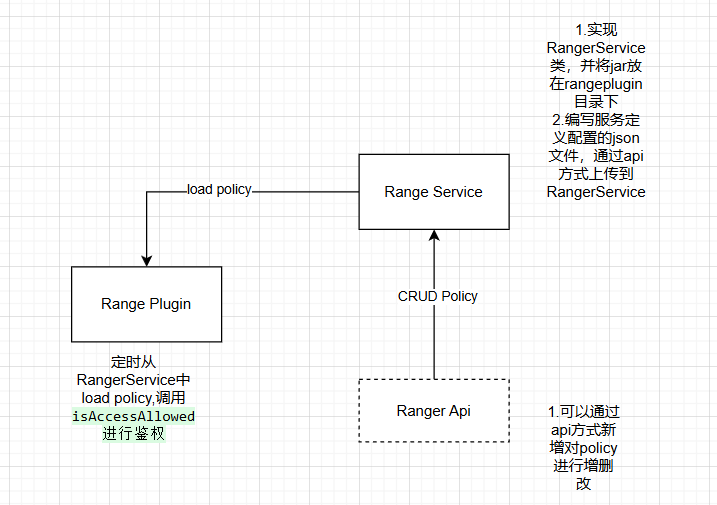
Apache Ranger为Hadoop体系提供了同意的安全体系,包括访问权限控制和统一的审计(记录谁访问Ranger进行权限设置或者校验等操作)。如果想要开发一个Ranger的插件主要三个部分:

Ranger服务端:需要定义一个服务类型JSON文件上传给Ranger Service,以及实现一个RangerBaseService类作为Ranger服务的资源查找,或者配置检验的jar包放到Ranger服务的range-plugins/目录。

Ranger鉴权的插件:根据Ranger提供的接口实现一个鉴权的插件,这个插件会定时从Ranger-Service端将权限同步到本地,需要鉴权的服务可以用对应的接口来进行权限校验。很多服务例如doris,hive是将这个插件集成到了他们的服务中,当然也可以拿出来单独使用,例如自己解析Sql语句拿到用户以及对应表时在调用插件接口进行鉴权。

Ranger授权api:这一部分可以通过Ranger提供的UI手动进行添加,ranger也提供了api,用户可以通过api进行新增权限,或者删除更改权限等。权限这块Ranger内称之为RangerPolicy策略。
image-20241231173211402.png

Ranger服务端

实现RangerBaseService类

public class RangerServicePaimon extends RangerBaseService {
    @Override
    public Map<String, Object> validateConfig() {

        return new HashMap<>();
    }
    @Override
    public List<String> lookupResource(ResourceLookupContext resourceLookupContext) throws Exception {

        return new ArrayList<>();
    }
}

此类有两个方法,都是用于在Ranger Service UI上做资源查询,或者配置检验时用的,可以不做实现,直接返回空也没问题。之后需要将实现的jar包放入range-plugins/目录下之后重启Ranger服务。

服务定义描述文件

{
  "name": "paimon",
  "displayName": "Paimon",
    //对应jar包的service实现类
  "implClass": "com.jiduauto.ranger.service.paimon.RangerServicePaimon", 
  "label": "Paimon",
  "description": "Paimon",
  //需要进行权限检验的资源
  "resources": [
    {
      "itemId": 1,
      "name": "catalog",
      "type": "string",
      "level": 10,
      "parent": "",
      "mandatory": true,
      "isValidLeaf": true,
      "lookupSupported": true,
      "recursiveSupported": false,
      "excludesSupported": true,
      "matcher": "org.apache.ranger.plugin.resourcematcher.RangerDefaultResourceMatcher",
      "matcherOptions": {
        "wildCard": true,
        "ignoreCase": true
      },
      "validationRegEx": "",
      "validationMessage": "",
      "uiHint": "",
      "accessTypeRestrictions": [
        "create",
        "show",
        "alter",
        "drop"
      ],
      "label": "Paimon Catalog",
      "description": "Paimon Catalog"
    },
    {
      "itemId": 2,
      "name": "database",
      "type": "string",
      "level": 20,
      "parent": "catalog",
      "mandatory": true,
      "isValidLeaf": true,
      "lookupSupported": true,
      "recursiveSupported": false,
      "excludesSupported": true,
      "matcher": "org.apache.ranger.plugin.resourcematcher.RangerDefaultResourceMatcher",
      "matcherOptions": {
        "wildCard": true,
        "ignoreCase": true
      },
      "validationRegEx": "",
      "validationMessage": "",
      "uiHint": "",
      "accessTypeRestrictions": [
        "create",
        "show",
        "alter",
        "drop"
      ],
      "label": "Paimon Database",
      "description": "Paimon Database"
    },
    {
      "itemId": 3,
      "name": "table",
      "type": "string",
      "level": 30,
      "parent": "database",
      "mandatory": true,
      "isValidLeaf": true,
      "lookupSupported": true,
      "recursiveSupported": false,
      "excludesSupported": true,
      "matcher": "org.apache.ranger.plugin.resourcematcher.RangerDefaultResourceMatcher",
      "matcherOptions": {
        "wildCard": true,
        "ignoreCase": true
      },
      "validationRegEx": "",
      "validationMessage": "",
      "uiHint": "",
      "accessTypeRestrictions": [
        "create",
        "show",
        "alter",
        "drop",
        "insert",
        "select"
      ],
      "label": "Paimon Table",
      "description": "Paimon Table"
    },
    {
      "itemId": 4,
      "name": "column",
      "type": "string",
      "level": 40,
      "parent": "table",
      "mandatory": true,
      "lookupSupported": true,
      "recursiveSupported": false,
      "excludesSupported": true,
      "matcher": "org.apache.ranger.plugin.resourcematcher.RangerDefaultResourceMatcher",
      "matcherOptions": {
        "wildCard": true,
        "ignoreCase": true
      },
      "validationRegEx": "",
      "validationMessage": "",
      "uiHint": "",
      "accessTypeRestrictions": [
        "select"
      ],
      "label": "Paimon Column",
      "description": "Paimon Column"
    }
  ],//需要进行校验的访问类型
  "accessTypes": [
    {
      "itemId": 1,
      "name": "show",
      "label": "Show"
    },
    {
      "itemId": 2,
      "name": "insert",
      "label": "Insert"
    },
    {
      "itemId": 3,
      "name": "alter",
      "label": "Alter"
    },
    {
      "itemId": 4,
      "name": "create",
      "label": "Create"
    },
    {
      "itemId": 5,
      "name": "drop",
      "label": "Drop"
    },
    {
      "itemId": 6,
      "name": "select",
      "label": "Select"
    },
    {
      "itemId": 7,
      "name": "all",
      "label": "All",
      "impliedGrants":
      [
        "select",
        "insert",
        "create",
        "drop",
        "alter",
        "show"
      ]
    }
  ],
   // ranger serviceUI上需要填写的配置,RangerBaseService的validateConfig方法就是对这些配置进行校验
  "configs": [
    {
      "itemId": 1,
      "name": "username",
      "type": "string",
      "mandatory": true,
      "validationRegEx": "",
      "validationMessage": "",
      "uiHint": "",
      "label": "Username"
    },
    {
      "itemId": 2,
      "name": "password",
      "type": "password",
      "mandatory": false,
      "validationRegEx": "",
      "validationMessage": "",
      "uiHint": "",
      "label": "Password"
    },
    {
      "itemId": 3,
      "name": "jdbc.driver_class",
      "type": "string",
      "mandatory": true,
      "validationRegEx": "",
      "validationMessage": "",
      "uiHint": "",
      "defaultValue": "com.mysql.cj.jdbc.Driver"
    },
    {
      "itemId": 4,
      "name": "jdbc.url",
      "type": "string",
      "mandatory": true,
      "defaultValue": "",
      "validationRegEx": "",
      "validationMessage": "",
      "uiHint": ""
    }
  ],
  "enums": [
  ],
  "contextEnrichers": [
  ],
  "policyConditions":
  [
  ],//对数据某些字段进行脱敏使用
  "dataMaskDef": {
    "accessTypes": [
      {
        "name": "select"
      }
    ],
    "resources": [
      {
        "name": "catalog",
        "matcherOptions": {
          "wildCard": "true"
        },
        "lookupSupported": true,
        "uiHint":"{ \"singleValue\":true }"
      },
      {
        "name": "database",
        "matcherOptions": {
          "wildCard": "true"
        },
        "lookupSupported": true,
        "uiHint":"{ \"singleValue\":true }"
      },
      {
        "name": "table",
        "matcherOptions": {
          "wildCard": "true"
        },
        "lookupSupported": true,
        "uiHint":"{ \"singleValue\":true }"
      },
      {
        "name": "column",
        "matcherOptions": {
          "wildCard": "true"
        },
        "lookupSupported": true,
        "uiHint":"{ \"singleValue\":true }"
      }
    ],//脱敏的函数
    "maskTypes": [
      {
        "itemId": 1,
        "name": "MASK",
        "label": "Redact",
        "description": "Replace lowercase with 'x', uppercase with 'X', digits with '0'",
        "transformer": "mask({col})",
        "dataMaskOptions": {
        }
      },
      {
        "itemId": 2,
        "name": "MASK_SHOW_LAST_4",
        "label": "Partial mask: show last 4",
        "description": "Show last 4 characters; replace rest with 'x'",
        "transformer": "mask_show_last_n({col}, 4, 'x', 'x', 'x', -1, '1')"
      },
      {
        "itemId": 3,
        "name": "MASK_SHOW_FIRST_4",
        "label": "Partial mask: show first 4",
        "description": "Show first 4 characters; replace rest with 'x'",
        "transformer": "mask_show_first_n({col}, 4, 'x', 'x', 'x', -1, '1')"
      },
      {
        "itemId": 4,
        "name": "MASK_HASH",
        "label": "Hash",
        "description": "Hash the value",
        "transformer": "mask_hash({col})"
      },
      {
        "itemId": 5,
        "name": "MASK_NULL",
        "label": "Nullify",
        "description": "Replace with NULL"
      },
      {
        "itemId": 6,
        "name": "MASK_NONE",
        "label": "Unmasked (retain original value)",
        "description": "No masking"
      },
      {
        "itemId": 12,
        "name": "MASK_DATE_SHOW_YEAR",
        "label": "Date: show only year",
        "description": "Date: show only year",
        "transformer": "mask({col}, 'x', 'x', 'x', -1, '1', 1, 0, -1)"
      },
      {
        "itemId": 13,
        "name": "CUSTOM",
        "label": "Custom",
        "description": "Custom"
      }
    ]
  },//对数据行级过滤
  "rowFilterDef": {
    "accessTypes": [
      {
        "name": "select"
      }
    ],
    "resources": [
      {
        "name": "catalog",
        "matcherOptions": {
          "wildCard": "true"
        },
        "lookupSupported": true,
        "mandatory": true,
        "uiHint": "{ \"singleValue\":true }"
      },
      {
        "name": "database",
        "matcherOptions": {
          "wildCard": "true"
        },
        "lookupSupported": true,
        "mandatory": true,
        "uiHint": "{ \"singleValue\":true }"
      },
      {
        "name": "table",
        "matcherOptions": {
          "wildCard": "true"
        },
        "lookupSupported": true,
        "mandatory": true,
        "uiHint": "{ \"singleValue\":true }"
      }
    ]
  }
}

说白了就是定义一些资源,以及对这些资源进行校验的访问类型。例如table资源支持的访问类型是"create","show", "alter","drop","insert","select"。

这里简单说一下dataMaskDef,例如用户查询时想对某些字段进行脱密,他的查询sql是:SELECT NAME,PHONE FROM USER;对phone字段想做脱敏的话可以将查询修改为:SELECT NAME,CAST(mask(PHONE) AS STRING) FROM USER。实现这个功能就需要平台侧拿到sql之后对sql进行解析得到表的字段,之后访问Ranger判断这个字段需不需要进行datamask,需要的或就将其转换成对应的函数。

https://juejin.cn/post/7231858374827933753这篇文章讲的更细致一些,可以参考。

注意:range只是用做记录哪些表的字段需要做datamask,具体解析sql之类的需要平台自己去做,可以将Ranger当做一个记录了权限相关信息的数据库来看。

Ranger Plugin

rangerPlugin会定时从service load相关policy到本地做鉴权。需要定义三个xml文件。需要将以下三个文件放在resources文件下,或者放在java启动时classpath下:

ranger-paimon-dev-audit.xml

<?xml version="1.0" encoding="UTF-8"?>
<?xml-stylesheet type="text/xsl" href="configuration.xsl"?>
<configuration>
</configuration>

ranger-paimon-dev-policymgr-ssl.xml

<?xml version="1.0"?>
<?xml-stylesheet type="text/xsl" href="configuration.xsl"?>
<configuration xmlns:xi="http://www.w3.org/2001/XInclude">
    <!--  The following properties are used for 2-way SSL client server validation -->
    <property>
        <name>xasecure.policymgr.clientssl.keystore</name>
        <value>hadoopdev-clientcert.jks</value>
        <description>
            Java Keystore files
        </description>
    </property>
    <property>
        <name>xasecure.policymgr.clientssl.truststore</name>
        <value>cacerts-xasecure.jks</value>
        <description>
            java truststore file
        </description>
    </property>
    <!--路径自己指定一个-->
    <property>
        <name>xasecure.policymgr.clientssl.keystore.credential.file</name>
        <value>jceks://file/User/xxxx/work/keystore-hadoopdev-ssl.jceks</value>
    </property>

    <!--路径自己指定一个-->
    <property>
        <name>xasecure.policymgr.clientssl.truststore.credential.file</name>
        <value>jceks://file/User/xxx/work/truststore-hadoopdev-ssl.jceks</value>
    </property>
</configuration>

ranger-paimon-dev-security.xml

<?xml version="1.0"?>
<?xml-stylesheet type="text/xsl" href="configuration.xsl"?>
<configuration xmlns:xi="http://www.w3.org/2001/XInclude">
<!--此处填写测试环境创建的ranger service name-->
    <property>
        <name>ranger.plugin.paimon-dev.service.name</name>
        <value>paimonrt</value>
    </property>

    <property>
        <name>ranger.plugin.paimon-dev.policy.source.impl</name>
        <value>org.apache.ranger.admin.client.RangerAdminRESTClient</value>
    </property>
<!--此处填写测试环境的ranger admin url 不要写ip 如果有kerberos认证-->
    <property>
        <name>ranger.plugin.paimon-dev.policy.rest.url</name>
        <value>xxxxxx</value>
    </property>

    <property>
        <name>ranger.plugin.paimon-dev.policy.pollIntervalMs</name>
        <value>30000</value>
        <description>
            How often to poll for changes in policies?
        </description>
    </property>
    <property>
        <name>ranger.plugin.paimon-dev.policy.rest.ssl.config.file</name>
        <value>ranger-paimon-policymgr-ssl.xml</value>
        <description>
            Path to the file containing SSL details to contact Ranger Admin
        </description>
    </property>
<!--cache路径自己指定一个-->
    <property>
        <name>ranger.plugin.paimon-dev.policy.cache.dir</name>
        <value>/Users/xxxx/work/cache</value>
        <description>
            Directory where Ranger policies are cached after successful retrieval from the source
        </description>
    </property>
</configuration>

实现Plugin以及做验证,此处checkPermission()方法更详细的实现可以看,贴出的代码只是做个示例。

https://github.com/apache/ranger/compare/master...herefree:ranger:support-paimon-ranger

public class RangerPaimonPlugin extends RangerBasePlugin {

    public RangerPaimonPlugin(String serviceType) {
        super(serviceType, null, null);
        super.init();
    }

    public RangerPaimonPlugin(String serviceType, String serviceName) {
        super(serviceType, serviceName, null);
        super.init();
    }

}

public boolean checkPermission(AccessType accessType, PrivilegedEntity entity, UserGroupInformation ugi) {
          RangerPaimonPlugin plugin = new RangerPaimonPlugin('xxxx');
          RangerAccessRequestImpl request  = new RangerAccessRequestImpl();
          RangerResourceImpl      resource = new RangerResourceImpl();
          resource.setValue("queue", entity.getName());
          request.setResource(resource);
          request.setAccessType(getRangerAccessType(accessType));
          request.setUser(ugi.getShortUserName());
           request.setUserGroups(Sets.newHashSet(ugi.getGroupNames()));
           request.setAccessTime(new Date());
           request.setClientIPAddress(getRemoteIp());
          RangerAccessResult result = plugin.isAccessAllowed(request);
          return result == null ? false : result.getIsAllowed();
     }

Ranger Api

用户可以使用Api方式来对policy进行增删改查,当前也可以在rangerServiceUI上进行操作,这里记录下如何使用api方式创建policy。ranger官方api文档https://cwiki.apache.org/confluence/display/RANGER/Ranger+Client+Libraries

public class PaimonPolicyManager {
    private RangerClient rangerClient;

    private String policyName;
    private String RANGER_SERVICE_NAME;
    public void createPolicy() {
       //先通过api查找是否存在对应的policy
        Map<String, String> filter = new HashMap<>();
        filter.put("policyName", policyName);
        filter.put("serviceName", RANGER_SERVICE_NAME);
        List<RangerPolicy> policies = rangerClient.findPolicies(filter);
        if (policies.isEmpty()) {
            //不存在就创建新的policy
            rangerClient.createPolicy(creatPolicy("group", policyName, "db", "tb", Collections.singletonList("select")));
        }else{
            //存在的话就更新,在原有的policy上新增一个Policyitem(例如原来有select权限,后面在新增个drop权限)
            List<String> updatePermission = new ArrayList<>();
            if(checkPolicy(policies.get(0),"group","select")) {
                RangerPolicy rangerPolicy = addPolicyIterm(policies.get(0), "group", Collections.singletonList("select"));
                rangerClient.updatePolicy(RANGER_SERVICE_NAME,policyName,rangerPolicy);
            }
        }
    }

    public boolean checkPolicy(RangerPolicy rangerPolicy, String group, String permissionOp) {
        for (RangerPolicy.RangerPolicyItem policyItem : rangerPolicy.getPolicyItems()) {
            List<String> groups = policyItem.getGroups();
            if (!groups.contains(group)) {
                continue;
            }
            for (RangerPolicy.RangerPolicyItemAccess access : policyItem.getAccesses()) {
                if (access.getType().equals(permissionOp)) {
                    return true;
                }
            }
        }
        return false;
    }

    public RangerPolicy createPolicy(String group, String policyName, String dbname, String tbName, List<String> permissionOpsList) {
        RangerPolicy rangerPolicy = new RangerPolicy();
        rangerPolicy.setService(RANGER_SERVICE_NAME);
        rangerPolicy.setName(policyName);
        rangerPolicy.setResources(creatResource(dbname,tbName));
        List<RangerPolicy.RangerPolicyItem> rangerPolicyItemList = new ArrayList<>();
        for(String op:permissionOpsList) {
            RangerPolicy.RangerPolicyItem rangerPolicyItem = creatRangerPolicyItem(group, op);
            rangerPolicyItemList.add(rangerPolicyItem);
        }
        rangerPolicy.setPolicyItems(rangerPolicyItemList);
        return rangerPolicy;
    }

    public static Map<String, RangerPolicy.RangerPolicyResource> createResource(String dbName, String tbName) {

        Map<String, RangerPolicy.RangerPolicyResource> resourceMap = new HashMap<>();
        resourceMap.put("catalog", new RangerPolicy.RangerPolicyResource("paimon"));
        resourceMap.put("database", new RangerPolicy.RangerPolicyResource(dbName));
        resourceMap.put("table", new RangerPolicy.RangerPolicyResource(tbName));

        return resourceMap;
    }

    public RangerPolicy.RangerPolicyItem createRangerPolicyItem(String group, String permission) {

        RangerPolicy.RangerPolicyItem rangerPolicyItem = new RangerPolicy.RangerPolicyItem();
        rangerPolicyItem.setGroups(Collections.singletonList(group));
        RangerPolicy.RangerPolicyItemAccess rangerPolicyItemAccess = new RangerPolicy.RangerPolicyItemAccess();
        rangerPolicyItemAccess.setType(permission);
        rangerPolicyItemAccess.setIsAllowed(true);
        rangerPolicyItem.setAccesses(Collections.singletonList(rangerPolicyItemAccess));

        return rangerPolicyItem;
    }

    private RangerPolicy addPolicyIterm(RangerPolicy rangerPolicy, String group, List<String> permissionOpList) {

        List<RangerPolicy.RangerPolicyItem> addRangerPolicyItemList = new ArrayList<>();
        for (String permissionOp : permissionOpList) {
            addRangerPolicyItemList.add(createRangerPolicyItem(group, permissionOp));
        }
        List<RangerPolicy.RangerPolicyItem> policyItems = rangerPolicy.getPolicyItems();
        policyItems.addAll(addRangerPolicyItemList);

        return rangerPolicy;
    }

}

在Flinksql 解析的文章中,我们了解了filter是如何从sql下发到paimon,本文我们介绍下paimon拿到这些filter是如何进行优化的。

Flink PushDown

Flink 下发到Paimon用于过滤的接口:

1.SuportsFilterPushDown用于下推where语句里面的filter,注意返回值是两个List,acceptedFilters表示Source节点可以使用的filter,remainingFilters表示不可以使用的filter。acceptedFilters可以帮助Flink优化执行计划,例如对某个值的过滤原来需要在DataStream里面做,但是Source节点在读取数据时就可以做这部分过滤了,Flink DataStream就不用生成相关节点了。

2.SupportsProjectionPushDown用于下发Projection也就是select里面选择的字段,当前paimon还未发布的1.0中已经支持了嵌套类型(row里面在套一层row)的下发了。此处过滤主要是用于读取Parquet文件或者orc文件时可以通过对应接口直接做Column读。

public interface SupportsFilterPushDown {
    Result applyFilters(List<ResolvedExpression> filters);
    final class Result {
        private final List<ResolvedExpression> acceptedFilters;
        private final List<ResolvedExpression> remainingFilters;

        private Result(
                List<ResolvedExpression> acceptedFilters,
                List<ResolvedExpression> remainingFilters) {
            this.acceptedFilters = acceptedFilters;
            this.remainingFilters = remainingFilters;
        }
    }
}

public interface SupportsProjectionPushDown {
    boolean supportsNestedProjection();
    @Deprecated
    default void applyProjection(int[][] projectedFields) {
      
    }
    default void applyProjection(int[][] projectedFields, DataType producedDataType) {
        applyProjection(projectedFields);
    }
}

Paimon 过滤优化

版本1.0还未发布的master分支

Paimon总体的过滤分为两部分:

1.读取元数据时根据元数据里面的一些统计信息,过滤出真正需要读取的Datasplit下发到下游。

2.读取数据文件时,根据File index、delete vector信息(row过滤)、projection信息(cloumn级别过滤)来过滤。

Reader Meta

代码MonitorSource(也就是consumer id方式流消费)

paimon的元数据里面存着很多统计信息,例如partition字段的max&&min&&nullCount,数据文件的key的max&&min&&nullCount还有value的max&&min&&nullCount。

paimon在FlinkSourceBuilder时,将相应的过滤信息存到ReaderBuilder里面

org.apache.paimon.flink.source.FlinkSourceBuilder#createReadBuilder
private ReadBuilder createReadBuilder(@Nullable org.apache.paimon.types.RowType readType) {
        ReadBuilder readBuilder = table.newReadBuilder();
        if (readType != null) {
            readBuilder.withReadType(readType); //此处就是projection
        }
        readBuilder.withFilter(predicate); //此处是sql 里面where的过滤信息
        if (limit != null) {
            readBuilder.withLimit(limit.intValue());//此处是limit信息
        }
        return readBuilder.dropStats();
    }

paimon真正开始读取元数据,过滤读取核心逻辑在plan里面

readBuilder.newStreamScan().plan().splits();

plan里面一层层点进去最终实现是在

SnapshotReaderImpl#read->AbstractFileStoreScan#plan

org.apache.paimon.operation.AbstractFileStoreScan#plan
    public Plan plan() {
        long started = System.nanoTime();
        ManifestsReader.Result manifestsResult = readManifests();
        Snapshot snapshot = manifestsResult.snapshot;
        List<ManifestFileMeta> manifests = manifestsResult.filteredManifests;
        Iterator<ManifestEntry> iterator = readManifestEntries(manifests, false);
        List<ManifestEntry> files = new ArrayList<>();
        while (iterator.hasNext()) {
            files.add(iterator.next());
        }
        if (wholeBucketFilterEnabled()) {
            files =
                    files.stream()
                            .collect(
                                    Collectors.groupingBy(
                                            file -> Pair.of(file.partition(), file.bucket()),
                                            LinkedHashMap::new,
                                            Collectors.toList()))
                            .values()
                            .stream()
                            .map(this::filterWholeBucketByStats)
                            .flatMap(Collection::stream)
                            .collect(Collectors.toList());
        }

        List<ManifestEntry> result = files;
        long scanDuration = (System.nanoTime() - started) / 1_000_000;
        if (scanMetrics != null) {
            long allDataFiles =
                    manifestsResult.allManifests.stream()
                            .mapToLong(f -> f.numAddedFiles() - f.numDeletedFiles())
                            .sum();
            scanMetrics.reportScan(
                    new ScanStats(
                            scanDuration,
                            manifests.size(),
                            allDataFiles - result.size(),
                            result.size()));
        }
    }

过滤逻辑都发生在上方部分,AbstractFileStoreScan还有两个子类分别是AppendOnlyFileStoreScan(appendOnly表)与KeyValueFileStoreScan(主键表)。

具体过滤逻辑就不在这展开写了,可以看到以上几个Scan都有不同的Filter的属性值

AbstractFileStoreScan
    private Filter<Integer> levelFilter = null;
    private Filter<ManifestEntry> manifestEntryFilter = null;
    private Filter<String> fileNameFilter = null;
    private ManifestCacheFilter manifestCacheFilter = null;
KeyValueFileStoreScan
    private Predicate keyFilter;
    private Predicate valueFilter;
AppendOnlyFileStoreScan
    private Predicate filter;

这些不同的过滤都是在newScan时被进一步拆开。

值得一提的是,fileindex的过滤也可能在ReadMeta时发生。当FileIndex数据文件较小时,会存储在元数据里面,具体可见FileIndex篇讲解。

Read DataFIle

代码ReaderOperator(consumer id方式读取的下一个flink节点)

readBuilder.newRead().createReader(split)

这个Split就是上游节点传来的数据文件的元信息,各种过滤都发生在createReader(split)里面。主要是delevectors(Row级别)过滤,fileindex过滤,各种文件存储直接读取column的接口。

其中FileIndex相关过滤、DeletionVector Reader的创建还有传下来的projection都在下面代码。

org.apache.paimon.operation.RawFileSplitRead#createFileReader
private FileRecordReader<InternalRow> createFileReader(
            BinaryRow partition,
            DataFileMeta file,
            DataFilePathFactory dataFilePathFactory,
            FormatReaderMapping formatReaderMapping,
            IOExceptionSupplier<DeletionVector> dvFactory)
            throws IOException {
        FileIndexResult fileIndexResult = null;
        if (fileIndexReadEnabled) {
            fileIndexResult =
                    FileIndexEvaluator.evaluate(
                            fileIO,
                            formatReaderMapping.getDataSchema(),
                            formatReaderMapping.getDataFilters(),
                            dataFilePathFactory,
                            file);//此处对FileIndex进行过滤
            if (!fileIndexResult.remain()) { 
                return new EmptyFileRecordReader<>();
            }
        }

        FormatReaderContext formatReaderContext =
                new FormatReaderContext(
                        fileIO, dataFilePathFactory.toPath(file), file.fileSize(), fileIndexResult);
        FileRecordReader<InternalRow> fileRecordReader =
                new DataFileRecordReader(
                        formatReaderMapping.getReaderFactory(),
                        formatReaderContext,
                        formatReaderMapping.getIndexMapping(),//projection过滤对应的readDataFields在这里
                        formatReaderMapping.getCastMapping(),
                        PartitionUtils.create(formatReaderMapping.getPartitionPair(), partition));

        if (fileIndexResult instanceof BitmapIndexResult) {
            fileRecordReader =
                    new ApplyBitmapIndexRecordReader(
                            fileRecordReader, (BitmapIndexResult) fileIndexResult);
        }
//此处创建ApplyDeletionVectorReader
        DeletionVector deletionVector = dvFactory == null ? null : dvFactory.get();
        if (deletionVector != null && !deletionVector.isEmpty()) {
            return new ApplyDeletionVectorReader(fileRecordReader, deletionVector);
        }
        return fileRecordReader;
    }